

A simple POS for cafés and restaurants, with ordering from the table
Your menu goes live at its own link, and the same QR codes take orders from the table. Orders land on a live board, staff add counter orders, and each bill closes with a numbered receipt you print on the printer you already have. In the same plan as your menu, on a phone or tablet.
14 days free. No card needed.
From the table to the receipt
- 1
Add your tables
Say how many tables you have and print a table tent for each. Every table gets its own code.
- 2
Guests order from the table
They scan, add dishes to the cart and send. No app and no name; they see when it's being prepared and when it's ready.
- 3
Work from the board
New orders chime on your tablet. One tap moves each one on: preparing, ready, served.
- 4
Pay and print
At the counter, record how the guest paid and print a numbered receipt. The table is free again.
What it looks like
Screens from a demo café, exactly as they appear in Craftel.
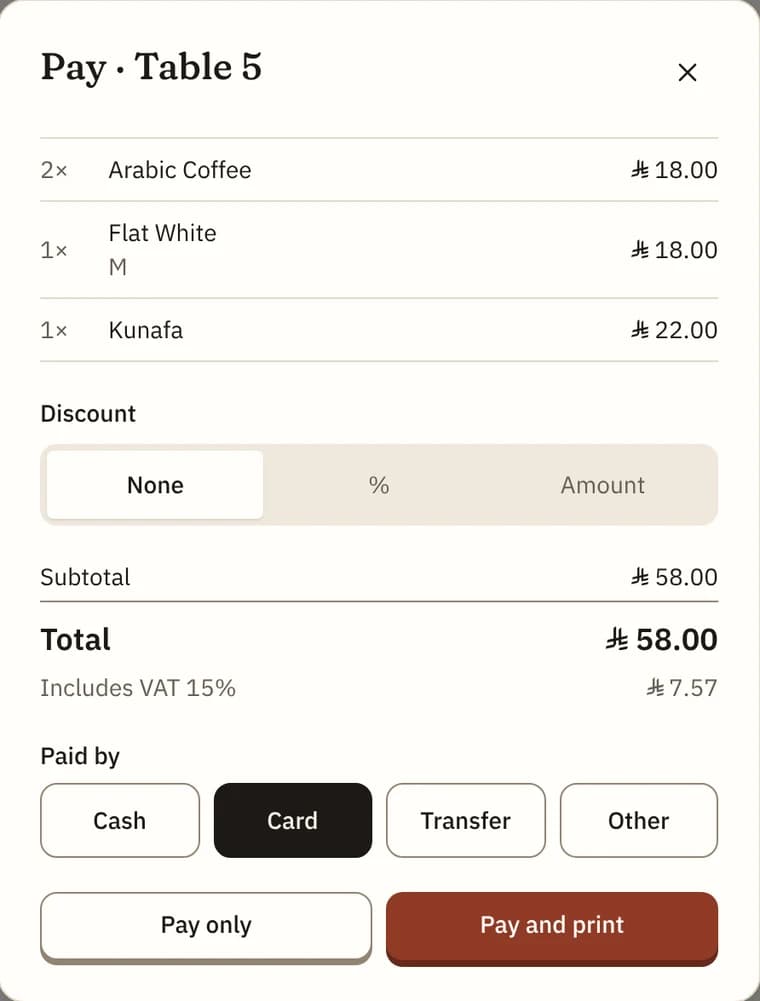
Pay: discount, service charge and VAT worked out, then how the guest paid. 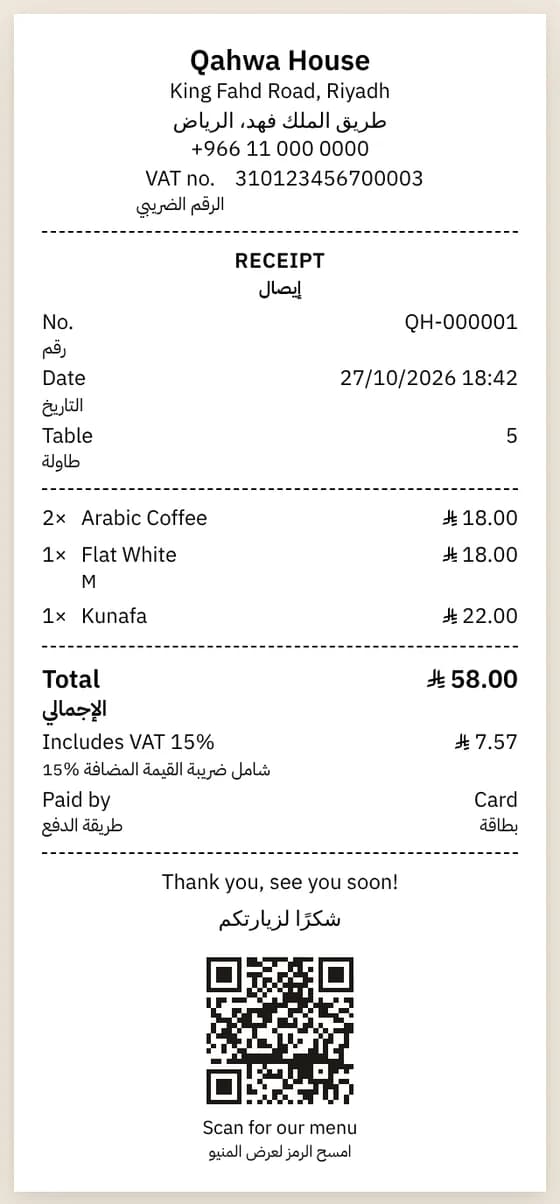
The receipt, in English and Arabic on an 80 mm roll. 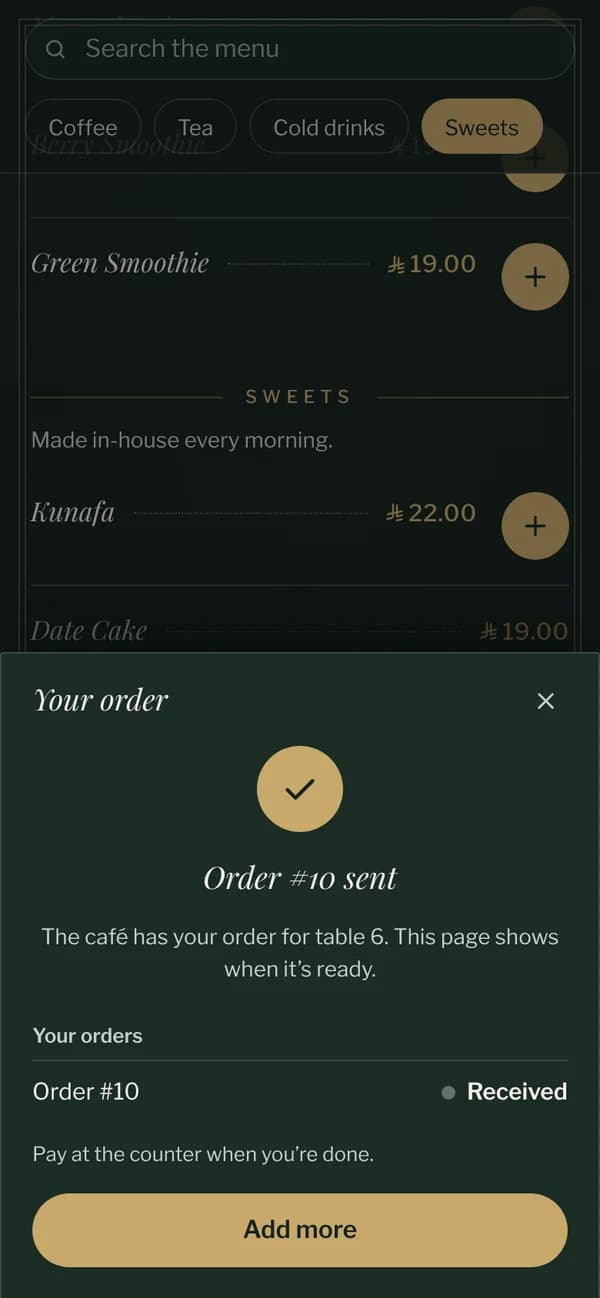
What the guest sees after sending an order from the table.
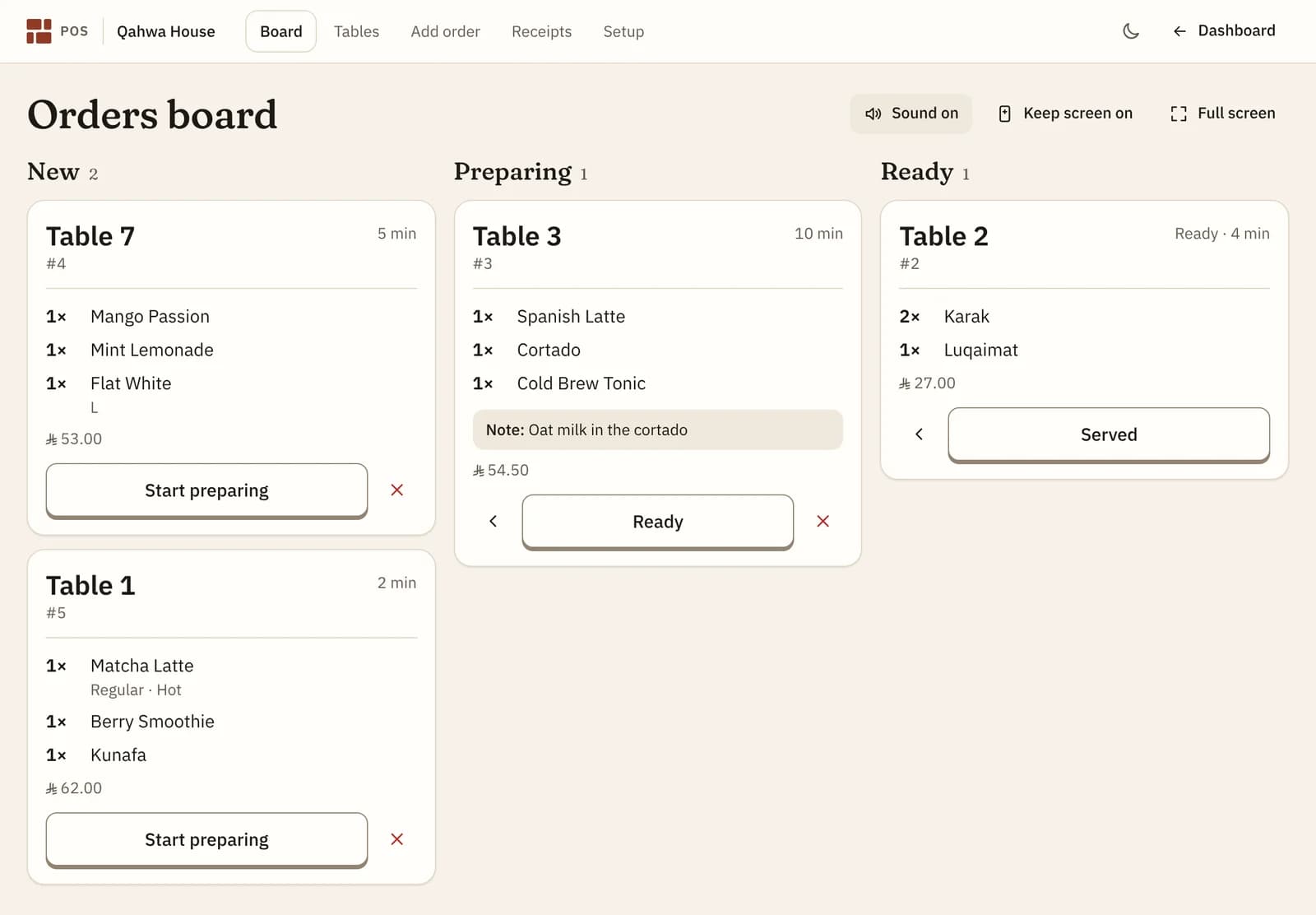
The board: every order, in the order it came
Open the POS on a tablet at the counter or in the kitchen. Orders from the tables appear by themselves in three columns, New, Preparing and Ready, with the table, the dishes and their options, any note, and how long the guest has been waiting. An order that has waited too long turns red.
Walk-ins, takeaway and phone orders go on the same board: staff tap the dishes for a table or for the counter, with an optional name, and send. Prices come from your menu, so nobody types a price by hand.
Bills, discounts, service charge and VAT
Each table keeps one running bill until it's paid, however many times the guests order. When they're ready to pay, the bill shows every line. Add a discount as a percentage or an amount, keep or remove your service charge, and the VAT is worked out for you, whether your prices include it or not.
Record how the guest paid, by cash, card, transfer or something else, and the bill closes. If an order was a mistake or the guest left, take it off the bill before paying, with a reason.
Receipts in Arabic, English or both
Every receipt gets the next number in your own series, like QH-000123, so there are never gaps. It can carry your logo, address, phone, VAT and commercial registration numbers, a thank-you line in your menu's languages and a QR code back to your menu. Print it on a 58 mm or 80 mm roll, or on A4.
Reprints are marked Copy. A receipt voided by an owner keeps its number and prints VOID, so your records stay complete.
The day, added up
At closing, the day's summary shows how many receipts you issued, the total, the discounts, service charge and VAT, and how much came in by cash, card and transfer. Voided receipts are listed apart. Print it on the same receipt printer, or look back at any earlier day.
What you need
A phone, tablet or computer you already have, signed in to your account, and an internet connection. To print receipts, any printer that device can already print to: an AirPrint receipt printer with an iPad, a printer with its print service on Android, or a driver on a counter computer. Printer setup help is built in.
What it doesn't do, honestly
Craftel's POS is deliberately simple. Before you rely on it, know what it leaves out:
- It records how a guest paid but doesn't process payments: keep your card machine. Guests can't pay online or at the table.
- Its receipts aren't tax invoices. In Saudi Arabia, VAT-registered businesses must issue tax invoices from a ZATCA-compliant e-invoicing system.
- It doesn't count stock, split one bill between guests, or print tickets on a kitchen printer; the board is the kitchen's screen.
- It doesn't connect to another POS or to delivery apps, and it needs an internet connection.
Why owners use Craftel as their POS
Included in the plan
The POS comes with your menu at no extra cost: no add-on, no commission on orders.
No new hardware
It runs in the browser on the phones and tablets you have, and prints on the printer you choose.
Menu and POS in one place
Change a price or mark a dish sold out once, and the menu, the board and the receipts all follow.
Arabic and English, as equals
Guests order in their language, and receipts print in Arabic, English or both.
What it costs
Free for the first 14 days, with every design and no card needed. After that it's $12 a month or $99 a year for one venue's menu, with your link, QR codes and table tents included. Table ordering, the board, bills, receipts and the daily summary are included at no extra cost.
See pricingQuestions about the POS
Do I need special hardware?
No. The POS runs in the browser on any phone, tablet or computer signed in to your account. A tablet at the counter is a good start.
Which receipt printer do I need?
Any printer your device can print to. On an iPad, an AirPrint receipt printer works straight away; on Android, use the printer maker's print service; on a computer, install its driver. Rolls of 58 mm or 80 mm and A4 are all supported.
Does it take card payments?
No. Guests pay at the counter with your card machine or in cash, and you record how they paid. Craftel never processes a payment, so there are no transaction fees.
Are the receipts tax invoices?
No. They're receipts, with your VAT number and the VAT amount if you add them. In Saudi Arabia, VAT-registered businesses must issue tax invoices from a ZATCA-compliant e-invoicing system, so keep that for invoices.
Can staff add orders for walk-ins and takeaway?
Yes. Add order lets staff tap dishes for a table or the counter, with an optional name and a note, and send them to the board. They're priced from your menu, like guests' orders.
Can I keep my current POS?
Yes. Leave table ordering off and Craftel is the menu guests read, next to whatever runs your till. It doesn't sync with another POS, so change prices in both.
Does it work with WhatsApp orders?
Yes, side by side. Pickup and delivery orders still go to your WhatsApp from the menu; orders from a table go to the board.